

How to Choose Rounded Corners for Board Books


When selecting rounded corners for board books, look at the corner radius, finished leaf thickness, book dimensions, artwork clearance and cutting quality all at once to determine which corner is right for you. Request your printer to provide their collection of profiles, try out some samples in the actual size and approve the construction before it is printed.
Rounded corners will reduce the outline of stiff pages and may help minimize corners wear. However “rounded” is not a full manufacturing specification.
Different curves, edge finishes, and page alignment can be clearly distinguished between two books even if they both have the same quotation for rounded corners. Read on to understand how publishers can make a better decision.
What Does Corner Radius Mean?
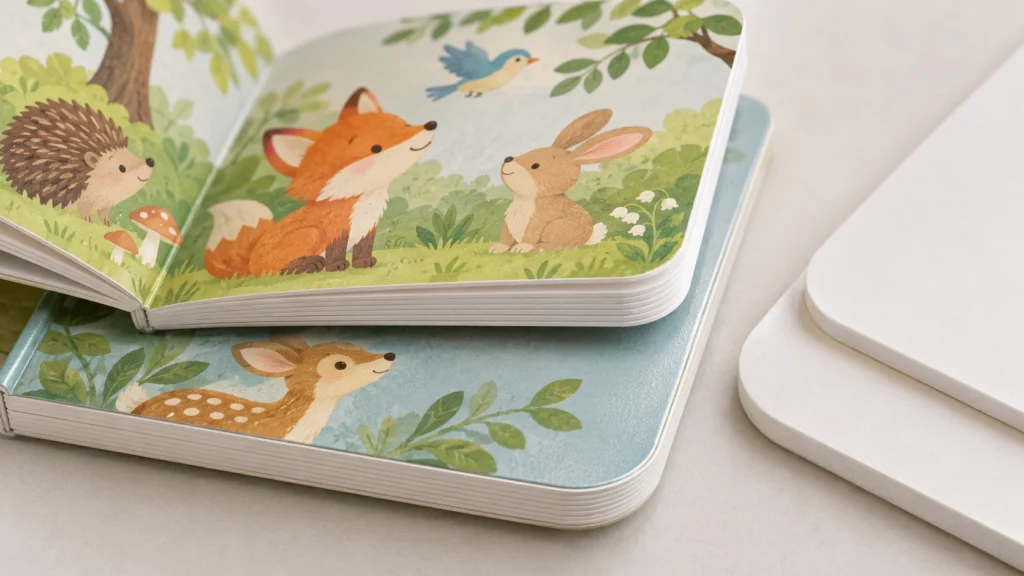
A corner radius is the curve in place of a square corner.
The larger the radius, the wider the curve and the more material will be removed from the original rectangular shape for a circular corner profile. The smaller the radius the closer to square it will be.
A radius can be expressed in notation as R6, which indicates a 6 mm radius. Make sure to use the unit and profile, not assuming everyone understands the same terms.
| Specification | What it controls | What to confirm |
|---|---|---|
| Corner radius | Breadth of the curve | Measurement and available tooling |
| Corner positions | Which corners are rounded | Cover and interior treatment |
| Finished dimensions | Overall book footprint | Width × height after trimming |
| Cut alignment | Consistency between leaves | Agreed sample and tolerances |
| Edge finish | Condition of the exposed layers | Smoothness and bonding quality |
The aim is a repeatable specification that the designer, printer, and inspector can all understand.
Start with the Printer’s Available Profiles
Ask which corner profiles the manufacturer already produces reliably.
Existing tooling may simplify production, while a custom curve can require additional setup or tooling. Availability varies, so avoid treating one radius as an industry-wide requirement.
Compare at least two profiles on actual-size samples. The same curve can appear generous on a compact book and subtle on a larger one.
For children’s board book printing, provide the intended trim size, leaf construction, and page count before requesting a recommendation.
A useful question is: “Which profiles work well with this exact construction?”
Match the Curve to the Book’s Proportions
The rounded corners are a feature of the book that adds to its overall appearance.
Simple illustrations and playful layouts can be complemented by a broad curve. A modest curve will leave more of the rectangular page area intact.
Both options are not necessarily superior. Think about the book when it is closed, open, and when it is placed next to other books in the series.
| Corner approach | Possible advantage | What to check |
|---|---|---|
| Smaller radius | Preserves more corner artwork | Whether the finished profile feels appropriate |
| Broader radius | Creates a softer visual outline | Loss of usable corner area |
| Custom contour | Supports a distinctive design | Tooling, consistency, and production complexity |
Keep the profile consistent across a series unless there is a clear reason to change it. Small differences become noticeable when books are displayed together.
Consider Leaf Thickness and Construction
The corner is an exposed cross-section of the leaf.
Its appearance depends on the printed layers, board or mounted cardstock, adhesive, and finishing—not just the curve.
A thick leaf with weak bonding may separate at the edge. An accurately cut curve can still look untidy if layers lift or adhesive remains visible.
Request a sample using the intended construction. Inspect every rounded corner, including the cover, and compare the front and back of the book.
For touch-and-feel board books, check how corner shaping interacts with inserts, spacers, and other components.
Protect Artwork Around the Rounded Area
The corner problem may be hidden in a rectangular layout until trimmed.
Normally images and backgrounds should be larger than the finished cutting trim line to meet the printer’s bleed requirements. What is important to include is in that outline and is safe from destruction.
Place a character’s face, a small caption or an important object away from the curve.
Ask for a cut path map and safe zone. Just a generic rectangular margin is not sufficient for showing a rounded corner clearance.
Print the layout full size, cut out the outline over it and check each page. Decorative borders need special attention as small differences in alignment may be noticeable.
Specify Cover and Interior Corners Separately
A self-cover board book and a separately cased board book do not necessarily use the same arrangement.
The outer cover may differ in size, thickness, or construction from the interior leaves. Confirm which corners are rounded and how the cover relates to the page block.
Avoid instructions such as “round all corners” without an accompanying drawing or approved sample.
If the project is actually a children’s hardcover picture book, discuss its cover and flexible interior pages separately. Specifications should follow the physical product.
Inspect Cutting Quality Before Approval
A digital proof is a record of artwork placement. It does not show any edge smoothness, layer adhesion or alignment in a stack of rigid leaves.
On the physical specimen, check for broken fibers, jagged edges, peeling film, irregular curves and bulging layers. Gently open and close the book to be sure leaves move freely.
When possible, compare more than one sample. A single good corner doesn’t make a good run.
Rounded corners are a design feature and in isolation are not a guarantee of safety or compliance.
Record the Approved Specification
Record radius, corners, trim size, construction of leaves, artwork template and tolerances before production.
Maintain a physical sample that is acceptable. Before accepting a material or tooling change offered by the printer, confirm the impact that such change may have on the product.
Clear instructions minimize needless disagreements (and repeat orders are much easier).
Frequently Asked Questions
What corner radius is best for board books?
There is no universal best radius. Compare the printer’s available profiles using your actual book dimensions and construction.
Does a larger radius make a book safer?
A larger curve changes the outline, but safety cannot be determined from radius alone. The complete product needs appropriate assessment.
Should every corner be rounded?
Confirm the intended treatment with the printer. Corner positions depend on the book’s binding and construction.
Do rounded corners reduce the book’s dimensions?
They remove material within the original rectangular outline. The stated bounding width and height generally remain the same.
Can rounded corners damage artwork?
They can remove important details if the layout ignores the cutting profile. Use the approved template and safe area.
Are custom corner profiles more expensive?
They may require extra tooling or setup. Request an itemized comparison with the manufacturer’s existing options.
Why do some rounded corners separate?
Possible contributors include bonding, material compatibility, cutting conditions, and handling. Inspect the affected layers before assigning a cause.
What should publishers approve before mass production?
Approve a representative bound sample, the corner profile, artwork clearance, edge finish, construction, and agreed production tolerances.
Share on Social:


